Streamers Join Instagram Join Discord Download Server is currently offline
Inglês
Português
Polonês
Espanhol
Sueco
Alemão
Contentbox headline

Player Market

The Player Market lets a character open a personal shop while staying online on a market tile. Buyers can inspect full item details, choose the amount they can afford, and buy directly with gold or UnderOld Coins.

Online Shop Gold and UC Offers Full Item Inspection 40 Slot Maximum

Where to Use

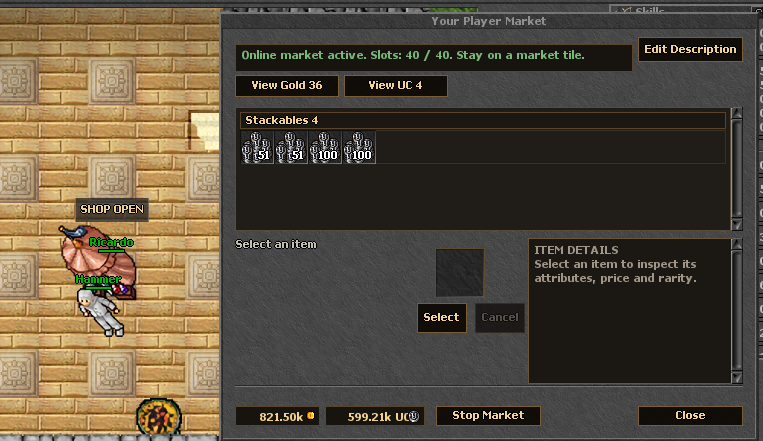
Player Market open beside a seller with a SHOP OPEN label
Seller view: the shop stays online while the character remains on a market tile.
Market Tiles Stand on a marked market tile in a city market area, right-click yourself, and choose Open Market.
Online Seller When the market starts, your character remains online, changes into the shop outfit, and cannot move until the market is stopped.
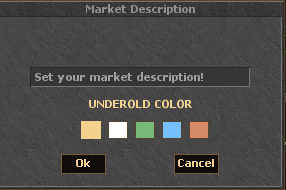
Shop Message You can write a short shop message and choose one of the available label colors so buyers know what you are selling.
Closing Rules Use Stop Market to move again. The shop also closes if the character leaves the market tile or logs out.

Slot Limits

Account / Permission Active Selling Slots Notes
Free Account 10 Every character starts with the base market access.
Free Account + Market Permission 20 Market Permission adds 10 slots for 7 days.
Premium Account 30 Premium adds 20 slots to the base limit.
Premium Account + Market Permission 40 40 is the current maximum active offer limit.

Market Permission is a Store item that costs 30 UnderOld Coins. If a bonus expires while you have more listed items than your current limit allows, remove offers until you are within your available slots.

Selling Items

  1. Stand on a market tile and open your Player Market.
  2. Add items from your backpack, set the unit price, and choose whether the offer is listed in gold or UnderOld Coins.
  3. Offers are organized into tabs and categories so buyers can browse them quickly.
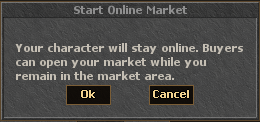
  4. Press Start Market to open the shop. Your character stays online and becomes fixed in place.
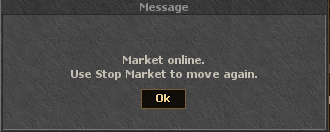
  5. Use Stop Market when you want to close the shop, recover movement, and return to your normal outfit.
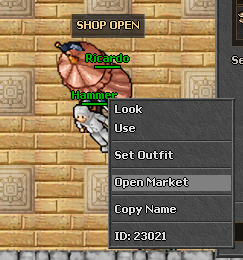
Open Market option in the character context menu
Use Open Market on yourself while standing on a market tile.
Market description window with UnderOld color choices
Set a short label and choose one of the available UnderOld colors.
Weapons Armors Helmets Legs Boots Shields Ammunition Runes Potions Containers Stackables Other
Start Online Market confirmation dialog
Starting the shop keeps the character online and visible to buyers.
Market online message explaining Stop Market
Use Stop Market to close the shop and move again.

Buying Items

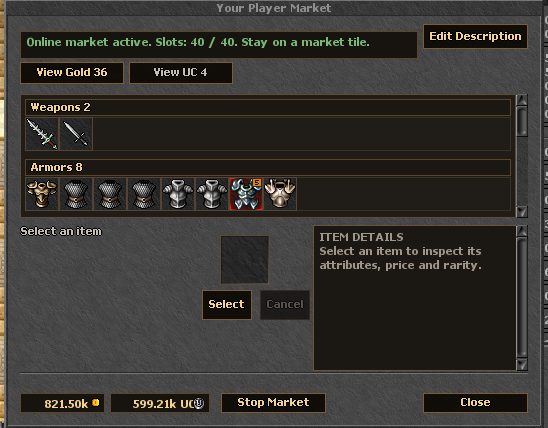
Player Market panel with item categories and item details
Offers are grouped by type, with a dedicated details panel for price, rarity, attributes and look text.
Open a Shop Right-click a selling character and choose Open Market. The shop window shows the seller's Gold and UC offers separately.
Inspect Before Buying Select an offer to see its name, amount, price, rarity, attributes, weight, and full look text.
Affordable Amount The amount selector is limited to what you can actually pay. Offers inside your balance are easier to notice, while offers outside your balance are dimmed.
Instant Delivery After purchase, the item is transferred instantly to the buyer. The seller receives the payment while the market is online.

Gold and UnderOld Coins

Currency Buyer Pays Seller Receives Fee
Gold The listed gold price. The listed gold price. No market fee.
UnderOld Coins The listed UC price. The UC price minus the market fee. 5% fee on UC sales.

Example: if an item is sold for 50 UnderOld Coins, the 5% fee is 2 UC and the seller receives 48 UC.
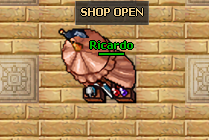
A seller using the shop outfit with a SHOP OPEN label
The shop label stays above the seller so nearby players can quickly see who is trading.

Container Rules

Regular items can be listed directly. Backpacks are restricted: only supported groups such as runes, ammunition, or food may be sold inside containers, and the container must hold identical items.

< Back to Game Systems

0

1

2

3

4

5

6

7

8

9

0

1

2

3

4

5

6

7

8

9

:

0

1

2

3

4

5

6

7

8

9

0

1

2

3

4

5

6

7

8

9

:

0

1

2

3

4

5

6

7

8

9

0

1

2

3

4

5

6

7

8

9

No live streamers yet.

View all streamers >>